Release Notes 2.8.1
Release 2.8.1 has been implemented successfully. The Dynamic Computing Services Team is pleased to inform you that the features listed below are now available:
These are the benefits of Release 2.8.1:
- The basis for Hybrid Cloud solutions - VMware vCloud Connector
- Enhanced networking feature for optimised bandwidth management
- Enhanced MS SQL licensing feature
- VMware vCloud Director upgrade
The basis for Hybrid Cloud Solutions - VMware vCloud Connector
The Dynamic Computing Services Team enhanced the Public Template catalogue with the VMware vCloud Connector node template.
VMware vCloud Connector links your own VMware based infrastructure with the Dynamic Computing Services, so you can manage both environments as a single hybrid cloud and transfer workloads back and forth.
Using the same vSphere client that you use today, you can now view, copy and operate on manage workloads, including virtual machines, vApps and templates across internal data center centres and the Dynamic Computing services. From the workloads view, you can view and manage virtual machines and vApps. From the catalogues view, you can view and manage your templates.
High-level overview:
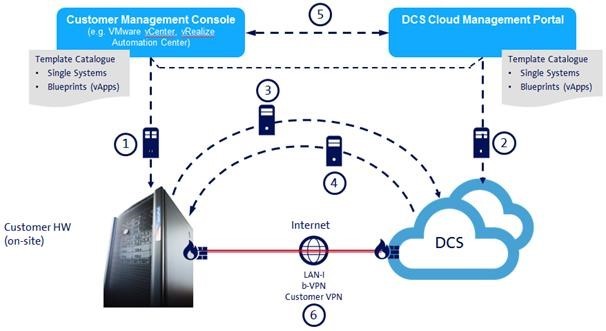
½: Provisioning of VMs local or in the cloud
¾: Move VMs from local to Dynamic Computing Services and vice versa
5: Catalogue Sync (Advanced vCloud Connector License required)
Simple and easy – install the vCloud Connector server and the vCloud Connector node in your local environment. Install the vCloud Connector node in your DCS environment. After configuring the components; your Hybrid Cloud solution is ready for use.
To learn more about the solution please see the following link:
http://www.vmware.com/products/vcloud-connector
For further technical details please read the official installation and configuration guide from VMware:
http://pubs.vmware.com/hybridcloud-27/topic/com.vmware.ICbase/PDF/vCloudConnector_27_InstallConfigure.pdf
Enhanced networking feature for optimised bandwidth management
You could order one internet connectivity with multiple IP addresses per Dynamic Data Center before this release. All IP addresses have shared the ordered bandwidth of this connection. New with this release, you are able to create several bandwidth pools per connection and assign IP addresses to these pools. This allows you to guarantee a fixed network bandwidth for different services and avoid time outs for critical services.
Enhanced MS SQL licensing feature
Before this release, we provided the possibility to order MS SQL licences in the DCS self-service portal. We introduced this feature as a result of Microsoft’s licence terms that our partners have not been allowed to use their own MS SQL licences. We enhanced this feature with this release and you will get automatic access to an additional template catalogue that includes the images (ISO files) for which you have ordered the licences.
VMware vCloud Director upgrade
The vCloud Director has been upgraded to the version 5.6.4 which provides increased operating system support for the following operating systems:
- Red Hat Enterprise Linux 7
- Ubuntu 14.04
- SUSE Linux Enterprise Server 12
- CentOS 6.5
- CentOS 7
- Oracle Linux 6.5
- Oracle Linux 7
Furthermore, this release resolves several vCloud Director issues.
For further information please see VMware’s official release notes: https://www.vmware.com/support/vcd/doc/rel_notes_vcloud_director_564.html
Release 2.4.2 comes with a big change.
IP and bandwith are no longer bound together (only for Dynamic Data Center and not for Dynamic Server).
When adding an external public network to your DDC-Environment, you are now able to
separately select the amount of IP’s and bandwith you want.
The bandwith you chose will then be shared evenly amongst all the IP’s you have assigned to your Data Center.
Note: This new feature comes also with new price details for both IP’s and bandwith.
But those only affect new customers and customers that switch profiles.